Flutter 레이아웃 메커니즘의 핵심은 위젯입니다. Flutter에서는 거의 모든 것이 위젯이고 심지어 레이아웃 모델도 위젯이죠. Flutter 앱 내에서 볼 수 있는 이미지, 아이콘, 글자 모두 위젯입니다. 하지만 row, column, grid 같이 볼 수 없는 위젯들도 있는데요. 이들은 보이는 위젯들을 제어하고, 제한하며, 정렬시켜줍니다.
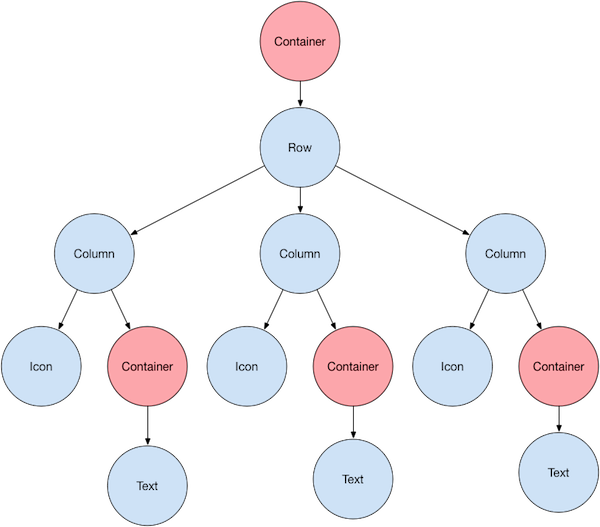
 

Container

자식 위젯들을 커스터마이징할 수 있는 위젯 클래스

여백, 간격, 테두리 또는 배경색을 추가하고 싶을 때 사용


Icon의 색상 - color 속성


폰트, 색상, 굵기 - Text.style 속성


Layout widgets

Single-child layout widgets

A widget that attempts to size the child to a specific aspect ratio.

Baseline

A widget that positions its child according to the child's baseline.

A widget that centers its child within itself.

A widget that imposes additional constraints on its child.

 
CustomSingleChildLayout

A widget that defers the layout of its single child to a delegate.

 
FittedBox

Scales and positions its child within itself according to fit.

 
FractionallySizedBox

A widget that sizes its child to a fraction of the total available space. For more details about the layout algorithm, see RenderFractionallySizedOverflowBox.

 
IntrinsicHeight

A widget that sizes its child to the child's intrinsic height.

 
IntrinsicWidth

A widget that sizes its child to the child's intrinsic width.

 
LimitedBox

A box that limits its size only when it's unconstrained.

 
Offstage

A widget that lays the child out as if it was in the tree, but without painting anything, without making the child available for hit testing, and without taking any room in the parent.

 
OverflowBox

A widget that imposes different constraints on its child than it gets from its parent, possibly allowing the child to overflow the parent.

A widget that insets its child by the given padding.

SizedBox

A box with a specified size. If given a child, this widget forces its child to have a specific width and/or height (assuming values are permitted by this widget's parent). If either the width or height is null, this widget will size itself to match the child's size in that dimension.

 
SizedOverflowBox

A widget that is a specific size but passes its original constraints through to its child, which will probably overflow.

A widget that applies a transformation before painting its child.


Multi-child layout widgets

Column

Layout a list of child widgets in the vertical direction.


CustomMultiChildLayout

A widget that uses a delegate to size and position multiple children.


Expanded


Expanded class - widgets library - Dart API

A widget that expands a child of a Row, Column, or Flex so that the child fills the available space. Using an Expanded widget makes a child of a Row, Column, or Flex expand to fill the available space along the main axis (e.g., horizontally for a Row or ve

api.flutter.dev

A widget that expands a child of a Row, Column, or Flex.


Flow

A widget that implements the flow layout algorithm.


GridView


GridView class - widgets library - Dart API

A scrollable, 2D array of widgets. The main axis direction of a grid is the direction in which it scrolls (the scrollDirection). The most commonly used grid layouts are GridView.count, which creates a layout with a fixed number of tiles in the cross axis,

api.flutter.dev

A grid list consists of a repeated pattern of cells arrayed in a vertical and horizontal layout. The GridView widget implements this component.


IndexedStack

A Stack that shows a single child from a list of children.


LayoutBuilder

Builds a widget tree that can depend on the parent widget's size.


ListBody

A widget that arranges its children sequentially along a given axis, forcing them to the dimension of the parent in the other axis.


ListView


ListView class - widgets library - Dart API

A scrollable list of widgets arranged linearly. ListView is the most commonly used scrolling widget. It displays its children one after another in the scroll direction. In the cross axis, the children are required to fill the ListView. If non-null, the ite

api.flutter.dev

A scrollable, linear list of widgets. ListView is the most commonly used scrolling widget. It displays its children one after another in the scroll direction. In the cross axis, the children are required to fill the ListView.


Row


Row class - widgets library - Dart API

A widget that displays its children in a horizontal array. To cause a child to expand to fill the available horizontal space, wrap the child in an Expanded widget. The Row widget does not scroll (and in general it is considered an error to have more childr

api.flutter.dev

Layout a list of child widgets in the horizontal direction.


Stack


Stack class - widgets library - Dart API

A widget that positions its children relative to the edges of its box. This class is useful if you want to overlap several children in a simple way, for example having some text and an image, overlaid with a gradient and a button attached to the bottom. Ea

api.flutter.dev

This class is useful if you want to overlap several children in a simple way, for example having some text and an image, overlaid with a gradient and a button attached to the bottom.


Table

A widget that uses the table layout algorithm for its children.


Wrap

A widget that displays its children in multiple horizontal or vertical runs.

  • you're adding a few elements to a large array
     push(...b) is very fast
  • you're adding many elements to a large array
     concat is slightly faster than a loop
  • you're adding many elements to a small array
     concat is much faster than a loop
  • you're usually adding only a few elements to any size array
    → loops are about as fast as the limited methods for small additions, but will never throw an exception even if it is not the most performant when you add many elements
  • you're writing a wrapper function to always get the maximum performance
    → you'll need to check the lengths of the inputs dynamically and choose the right method, perhaps calling push(...b_part) (with slices of the big b) in a loop.
 ms | Asize | Bsize | code
----+-------+-------+------------------------------
 ~0 |  any  |  any  | a.push(...b)
 ~0 |  any  |  any  | a.push.apply(a, b)
480 |   10M |    50 | a = a.concat(b)
  0 |   10M |    50 | for (let i in b) a.push(b[i])
506 |   10M |  500k | a = a.concat(b)
882 |   10M |  500k | for (let i in b) a.push(b[i])
 11 |    10 |  500k | a = a.concat(b)
851 |    10 |  500k | for (let i in b) a.push(b[i])

참고: https://stackoverflow.com/questions/1374126/how-to-extend-an-existing-javascript-array-with-another-array-without-creating/17368101#17368101

ScrollView의 contentContainerStyle prop으로 container style을 지정해주어야 컨텐츠의 길이가 부족하더라도 ScrollView의 영역을 확보할 수 있다.

ScrollView의 style prop에 flex: 1을 지정해주어도 ScrollView와 내부 View의 flex: 1이 작동하지 않는다.

중첩된 네비게이터의 루트의 파라미터를 받아올 때 타입 에러가 발생했다.

CompositeScreenProps를 잘못 사용한 줄로만 알고 여러가지 방법을 시도를 했으나,, 문제 원인은 한 네비게이터의 ParamList를 작성할 때 아래와 같이 작성한 탓이었다.

export type ParamList = {
	profile: { writingNo: number } | { profileNo: number };
}


아래는 React Navigation 공식 문서 내의 Type checking with Typescript 중 해당 내용을 발췌해 온 것이다.

Specifying undefined means that the route doesn't have params. A union type with undefined (e.g. SomeType | undefined) means that params are optional.

RouteProp의 ParamList에서 union 타입을 사용할 때는 undefined, 즉 파라미터가 있거나 없을 때 undefined와 함께 사용한다.

나와 같은 경우에는 optional properties로 적용해줘야 한다.


아래와 같이 해결했다.

export type ParamList = {
	profile: { writingNo?: number; profileNo?: number };
}

끗~

'Dev' 카테고리의 다른 글

push vs concat vs for loop  (0) 2022.09.16
style vs contentContainerStyle in ScrollView  (0) 2022.09.13
자료구조와 알고리즘, 시간복잡도/공간복잡도 (Big O)  (0) 2022.09.13
Flutter와 Dart  (0) 2022.09.06
React Native의 작동 원리  (0) 2022.09.06

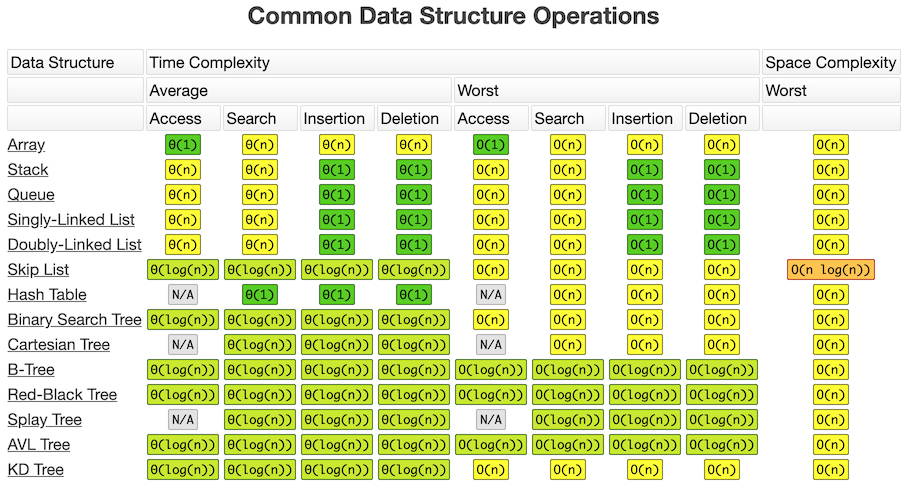
Big-O란?

알고리즘의 효율성을 표기해주는 표기법


시간 복잡도: 알고리즘의 시간 효율성
공간 복잡도: 알고리즘의 공간(메모리) 효율성


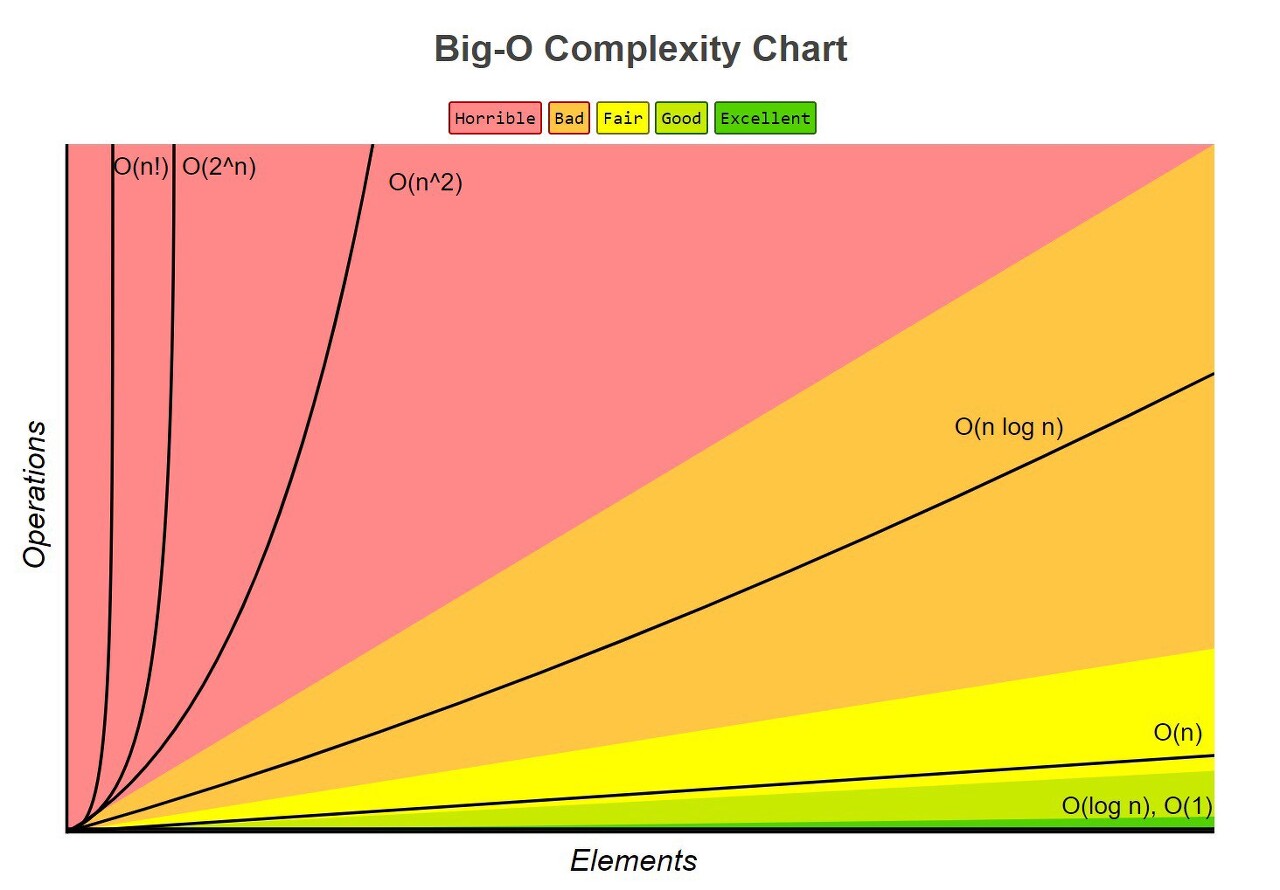
1. O(1) : 스택에서 Push, Pop

2. O(log n) : 이진트리

3. O(n) : for 문

4. O(n log n) : 퀵 정렬(quick sort), 병합정렬(merge sort), 힙 정렬(heap Sort)

5. O(n²): 이중 for 문, 삽입정렬(insertion sort), 거품정렬(bubble sort), 선택정렬(selection sort)

6. O(2ⁿ) : 피보나치 수열


참고:

https://noahlogs.tistory.com/27


빅오 표기법 (big-O notation) 이란

 컴퓨터 과학(Computer Science) 에서 알고리즘은 어떠한 문제를 해결하기 위한 방법이고, 어떠한 문제를 해결 하기 위한 방법은 다양하기 때문에 방법(알고리즘) 간에 효율성을 비교하기 위해 빅오(

noahlogs.tistory.com

https://soldonii.tistory.com/56https://soldonii.tistory.com/56


자바스크립트에서 Big O(시간 복잡도)란?

*Udemy의 "Master the Coding Interview : Data Structures + Algorithms" 강의에서 학습한 내용을 정리한 포스팅입니다. *https://soldonii.github.io에서 2019년 8월 19일(월)에 작성한 글을 티스토리로 옮겨..

soldonii.tistory.com


Dart

구글이 멀티 플랫폼 상에서 동작되도록 하는 앱을 위해 디자인된 프로그래밍 언어

C언어의 문법과 거의 같으며 Java, C#, Javascript와 같은 기능적 스트럭처를 추가한 언어

  • 웹, 서버, 모바일 앱 개발이 가능한 확장성 있는 오픈 소스 프로그래밍 언어 제공
  • AOT를 통해 네이티브로 컴파일되는 C 방식의 구문을 사용하는 객체 지향 단일 상속 언어를 제공
  • 자바스크립트로 변환(transcompile) 가능
  • 인터페이스와 추상 클래스 지원

JS vs Dart

진입점

JS에는 진입점 역할을 하는 함수가 미리 정의되어 있지 않다. 직접 지정해서 사용한다.

Dart에서는 최상단에 앱의 진입점인 main() 함수가 반드시 있어야 한다.


콘솔 출력

// Javascript
console.log('Hello World!');
// Dart
print('Hello world!')

변수

JS에서는 변수의 타입을 선언할 수 없다.

Dart에서는 명시적으로 변수의 타입을 선언하거나 타입 추론이 가능해야 한다.


wip

참고: https://flutter-ko.dev/docs/get-started/flutter-for/react-native-devs


React Native 개발자를 위한 Flutter

React Native 개발자가 Flutter 앱을 만들 때 기존 지식을 활용하는 방법을 배워봅시다.

flutter-ko.dev


Flutter

위젯이라는 작은 컴포넌트를 조합해 모바일 UI를 만든다.

플러터의 모든 것은 위젯이며 위젯은 뷰를 묘사하는 다트 클래스다. 구조, 스타일, 애니메이션 그리고 그 밖에 UI를 구성하는 모든 것이 위젯이다.


Flutter rendering

1. 애니메이트 - 애니메이션 티커(Animation ticker)가 동작하며 그리기 작업을 시작한다.

2. 빌드 - 플러터가 위젯 트리를 빌드한다.

3. 레이아웃 - 플러터가 트리를 내려갔다가 거슬러 올라오면서 대상 위젯의 레이아웃을 결정한다.

4. 조립 - 각 픽셀을 준비한다.

5. 그리기 - 플러터가 위젯을 그린다.

Native Treads

UI를 생성하는 부분

Android - Java/Kotlin

iOS - Objective-C/Swift


JS Thread

JS 코드를 통해 비즈니스 로직들이 실행되고 뷰를 언제, 어떻게 표시할지 실행되는 부분


Bridge

Native Threads(ex. 클라이언트)와 JS Thread(ex. 서버)가 소통하는 수단

각 부분에서 전달되는 정보는 JSONN object 형태로 변환되어 전달

병목현상이 가장 많이 생기는 부분 (= 앱 성능 향상을 위해서는 bridge를 건너는 횟수를 최소한으로 해야함)


앱 실행 과정

1. Native Threads 실행 -> Native Threads는 JS Thread를 실행시키고 JS Bundle을 로드한다.

2. JS Thread가 실행되면서 virtual DOM을 생성하고 diffing 알고리즘을 통해 변경사항을 bridge로 경유하여 shadow thread로 전달한다.

* diffing algorithm: React에서 virtual DOM을 사용하여 최소한의 변경사항을 파악하여 새롭게 렌더할 때 사용하는 알고리즘

3. shadow thread는 변경사항 메시지를 통해 화면의 레이아웃을 계산하고 계산이 끝난 레이아웃의 파라미터나 객체를 메인 스레드로 보낸다.

4. Native Threads가 UI를 화면에 표시한다.

5. 사용자가 화면에 입력한 UI 이벤트 정보들이 Native Bridge를 경유하여 JS Thread로 보내진다.

6. UI 이벤트 메시지를 활용하여 JS Thread에서 비즈니스 로직들이 실행되고 React는 다시 virtual DOM을 생성하며 변경사항을 다시 Native Bridge를 경유하여 shadow thread로 전달된다.

7. 3, 4, 5, 6 과정이 반복된다.


npm run android 실행 과정

1. 앱 처음 실행 시 필요한 ES5 JS 코드를 전달하기 위해 메트로 서버 실행 (npm start)

2. React Native 프로젝트 내부의 android 폴더로 이동 (cd android)

3. android/app/build.gradle 파일을 참조해 에뮬레이터에 앱 설치 (./gradlew installDebug)

4. 설치 완료 시 node_modules/.../native_module.gradle 파일을 참조해 안드로이드용 네이티브 모듈 설치 (gradle에게 설치 지시)


npm run ios 실행 과정

1. 앱 처음 실행 시 필요한 ES5 JS 코드를 전달하기 위해 메트로 서버 실행 (npm start)

2. React Native 프로젝트 내부의 ios 폴더로 이동 (cd ios)

3. pod 프로그램으로 ios/Podfile 파일을 참조해 원격 저장소에서 빌드 시 필요한 패키지를 다운받아 설치 (npx pod-install)

4. Xcode가 패키지를 사용해 앱을 빌드하고, 빌드된 앱을 시뮬레이터에 설치하고 실행 (npm run ios)

5. 메트로 서버에서 JS 번들을 내려받아 최종 앱 실행

keytool

jdk\bin 폴더에는 해시키를 생성할 수 있는 keytool이라는 프로그램이 들어있다. 이를 이용해 터미널에서 키 해시를 획득할 수 있다.


keytool 사용 환경

1. jdk\bin 디렉토리 환경변수 path에 등록
2. OpenSSL 설치
https://code.google.com/archive/p/openssl-for-windows/downloads


Google Code Archive - Long-term storage for Google Code Project Hosting.


code.google.com

2-1. openssl\bin 디렉토리 환경변수 path에 등록

키 해시 구하기

// 디버깅 키 해시
keytool -exportcert -alias androiddebugkey -keystore .\app\keystore\debug.keystore -storepass android -keypass android | openssl sha1 -binary | openssl base64

// 릴리즈 키 해시
keytool -exportcert -alias {key alias} -keystore {key 경로} | openssl sha1 -binary | openssl base64

Hash Key란?

오픈 API를 사용하려면 해시키를 등록해야 하고, Hash Key가 등록된 앱만 SDK를 이용해 API를 호출할 수 있다.

키 해시는 특정 데이터를 해시 함수(hash function)에 입력한 결과로 받은 리턴 값을 말한다.


해시 함수

해시 함수(hash function)는 임의의 길이의 데이터를 고정된 길이의 데이터로 매핑하는 함수이다. 해시 함수에 의해 얻어지는 값은 해시 값, 해시 코드, 해시 체크섬 또는 간단하게 해시라고 한다.

  • 데이터의 길이가 랜덤해도 리턴값의 길이는 일정하다.
  • 입력값이 같으면 리턴값도 언제나 동일하다.


Key Hash의 활용

API Provider(카카오, 구글 등)는 민감한 정보일 수도 있는 앱의 사이닝 키(signing key)값이 아닌 그 값을 해시한(특히 SHA-1 함수를 통해) hash key를 통해 인증된 사용자인지 여부를 판단합니다. 해시를 통한 사용자 인증의 장점은 해시값이 노출되어도 피해가 전혀 없다는 것입니다. 해시값만 가지고는 원본 데이터를 추론할 수 없기 때문입니다. 따라서 hash key가 노출되어도 입력값인 signing key는 안전합니다.

그럼 API Provider는 왜 해시가 등록된 앱에 대해서만 API 요청을 허용하는 것일까요? 그 이유는 바로 무분별한 트래픽을 방지하기 위해서입니다. 일반적으로 무료로 공개되어있는 API는 하루 1천 건, 2천 건 등의 요청수 제한을 두고 있습니다. 또한 제한이 있는 무료 사용자와 요청 제한이 없는 유료 사용자를 구분하는 용도로도 쓰일 수 있습니다.

출처: https://manorgass.tistory.com/76 [생각하는 개발자:티스토리]


OpenSSL이 필요한 이유

해시된 키의 binary값을 Base64 인코딩으로 표현한 값이 필요하기 때문이다.

+ Recent posts